

Description
Wood-Themed Chrome Experience for Windows & Mac
Overview
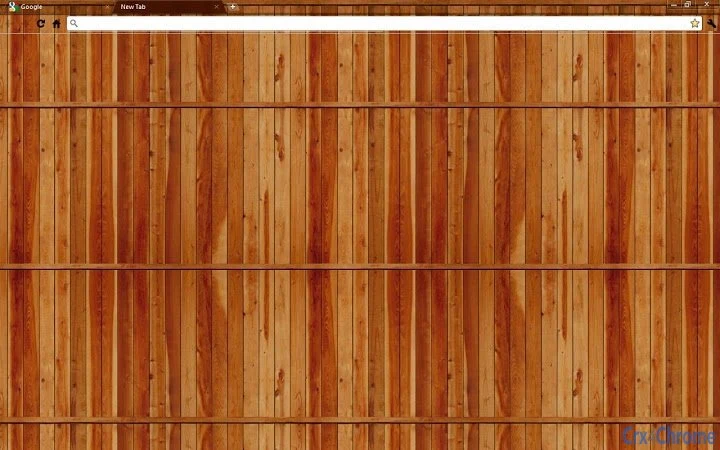
The Wood-Themed Chrome Experience is a desktop application designed specifically for users seeking a unique visual identity within the Google Chrome browser. This software functions as a browser theme, transforming the Chrome interface with a natural wood aesthetic. It targets users who value personalization and enjoy creating a distinct digital workspace. The theme is ideal for professionals and casual users alike who wish to stand out with a refined, organic design.
By applying a consistent wood texture across Chrome’s UI elements, the software enhances visual appeal and offers a calming, nature-inspired browsing environment. This can be particularly beneficial for users who spend long hours online and prefer a less harsh visual experience. The theme supports multiple variations, including black-based versions with accent colors, as noted in developer updates.
Although the developer did not provide additional background information, the software is actively maintained, with recent updates confirming bug fixes and new theme releases. It is distributed as a free tool, making it accessible to a broad audience. The application is designed for users who prioritize aesthetics without compromising functionality.
Key Features & Capabilities
- Natural Wood Aesthetic – Applies a detailed wood texture to Chrome’s toolbar, tabs, and background, creating a warm, organic visual style.
- Dark Theme Integration – Designed to work seamlessly with Chrome’s dark mode, enhancing contrast and reducing eye strain.
- Multiple Theme Variants – Offers a series of black-based themes with color accents including pink, blue, purple, green, yellow, and orange.
- Lightweight Design – With a file size of just 1.2 MB, the theme loads quickly and consumes minimal system resources.
- Free and Open Access – Available at no cost, with no hidden fees or subscription requirements.
Users can apply the theme to create a consistent look across devices, especially useful for those maintaining multiple Chrome profiles. The wood design provides a subtle yet impactful upgrade to the standard browser interface. It is particularly effective for users who work in creative fields or enjoy customizing their digital workspace. The theme does not alter browser functionality but enhances visual coherence and personal expression.
User Interface, Workflow & Performance
The user interface of the Wood-Themed Chrome Experience is minimal and focused on visual transformation. Installation involves a standard Chrome extension setup process, requiring no advanced technical knowledge. Once applied, the theme instantly changes the browser’s appearance without disrupting existing workflows.
Navigating through Chrome remains unchanged, with the theme only affecting the visual layer. The workflow efficiency is preserved, as no performance overhead is introduced. The developer did not specify resource usage details, but based on the 1.2 MB file size and the nature of browser themes, the impact on CPU and RAM is expected to be negligible.
Stability appears to be maintained, as recent updates confirm bug fixes. No reports of crashes or conflicts with other extensions were mentioned. The theme operates entirely within Chrome’s extension framework, ensuring compatibility with the browser’s update cycle. General performance notes suggest a smooth, consistent experience across supported platforms.
Compatibility & System Requirements
The software is compatible with both Windows and Mac operating systems, supporting the latest versions of Google Chrome. The installation size is 1.2 MB, which is compact and suitable for devices with limited storage.
Exact system requirements were not listed. However, since the application is a browser theme, it relies on Chrome’s built-in rendering engine and does not require specific hardware. The developer did not specify minimum CPU, RAM, or GPU requirements.
Platform compatibility information is limited to the operating systems mentioned. Users should ensure their Chrome browser is up to date to maintain full functionality. The software does not require administrative privileges for installation, making it accessible to standard users.
Pros and Cons
Pros
- Free to download and use with no hidden costs
- Lightweight design with minimal system impact
- Visually appealing wood and dark theme combination
- Multiple color variants available for personalization
- Easy installation and immediate visual results
Cons
- No advanced customization options beyond theme selection
- Limited to Google Chrome browser only
- Does not include interactive or functional features
- Developer background and support details not publicly available
- No official update notifications or changelog within the app
FAQ Section
Is this theme compatible with my version of Chrome?
The theme is designed for Google Chrome on both Windows and Mac. It is recommended to use the latest stable version of Chrome for optimal performance and compatibility.
Is the software safe to install?
As a browser theme distributed through official Chrome channels, it operates within the browser’s security sandbox. It does not access personal data or alter system files.
How do I update the theme?
Updates are delivered automatically through the Chrome Web Store when available. Users should ensure automatic updates are enabled in Chrome settings.
Can I use this theme offline?
Yes, once installed, the theme functions entirely offline. No internet connection is required to view or use the theme.
What license type does this software use?
The software is distributed under a free, non-commercial license. It is intended for personal use and cannot be redistributed or used in commercial projects.
Final Thoughts + CTA
The Wood-Themed Chrome Experience delivers a distinctive and visually engaging way to personalize the Google Chrome browser. With its natural wood aesthetic and dark mode integration, it offers a calming, sophisticated look that stands out from standard themes. The lightweight design ensures it runs smoothly without affecting system performance.
While it lacks advanced functionality, its purpose is clear: to enhance visual appeal. It is best suited for users who value aesthetics and enjoy customizing their digital environment. The availability of multiple color variants adds flexibility, allowing users to match their personal style.
For those seeking a simple, free, and effective way to refresh their browser interface, this theme is a solid choice. Download Wood Chrome Theme for Free now.
Guides & Tutorials for Wooded Chrome Theme by Everplex Media Theme for Chrome
How to install Wooded Chrome Theme by Everplex Media Theme for Chrome
- Click the Preview / Download button above.
- Once redirected, accept the terms and click Install.
- Wait for the Wooded Chrome Theme by Everplex Media Theme for Chrome download to finish on your device.
How to use Wooded Chrome Theme by Everplex Media Theme for Chrome
This software is primarily used for its core features described above. Open the app after installation to explore its capabilities.
User Reviews for Wooded Chrome Theme by Everplex Media Theme for Chrome 0
No reviews found





